Learn a language inside the stories you already watch
Zenyola is a language-learning platform with its own method. The episode is the material: each line comes with the meaning its words have right there, the grammar that holds it together and how it sounds.
The episode is the material.
El episodio es el material.
Every area below opens the same way: the line you learn above, yours below.
Two subtitles in sync over the video
The line in the language you learn, above the version people wrote for the same scene in your language. Side by side, they show how the idea is said, not only what each word means.
- Human translationBoth tracks are the ones professional translators made. Zenyola pairs them line by line and never invents a translation.
- Lines you can moveDrag both lines up or down. They step aside when the player’s controls appear and come back when they hide.
- Readable in any windowThe lettering keeps its full-screen size, whatever the size of the window.
- When your language is missingIf a title has no subtitles in your language, you go on with the line you learn and the dictionary, and a notice tells you so.
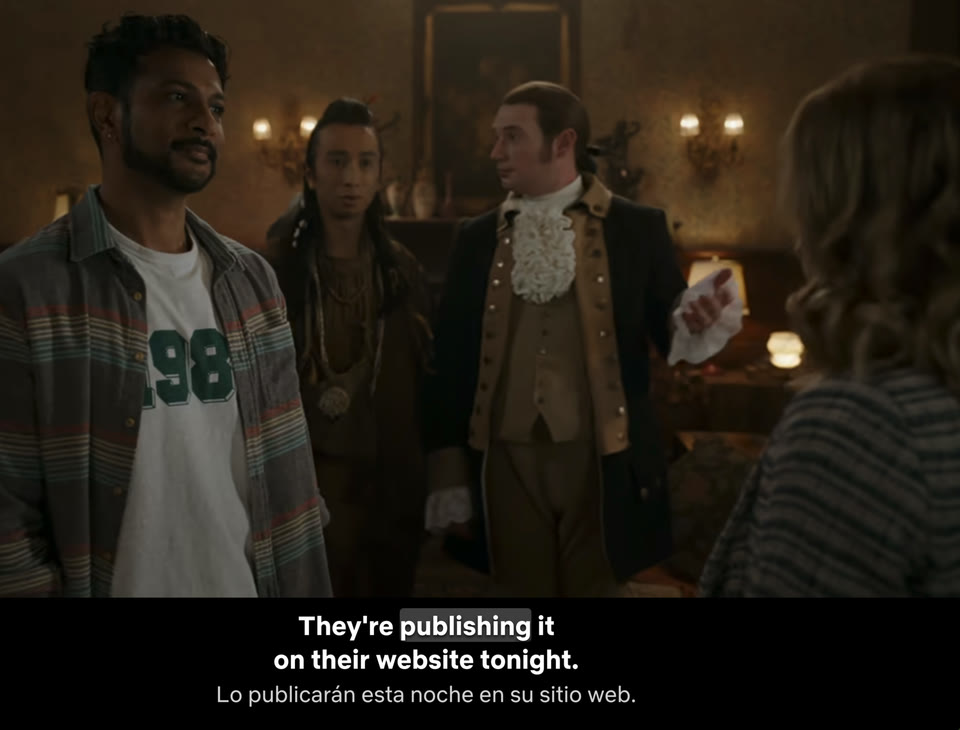
From the word to its meaning, in one tap
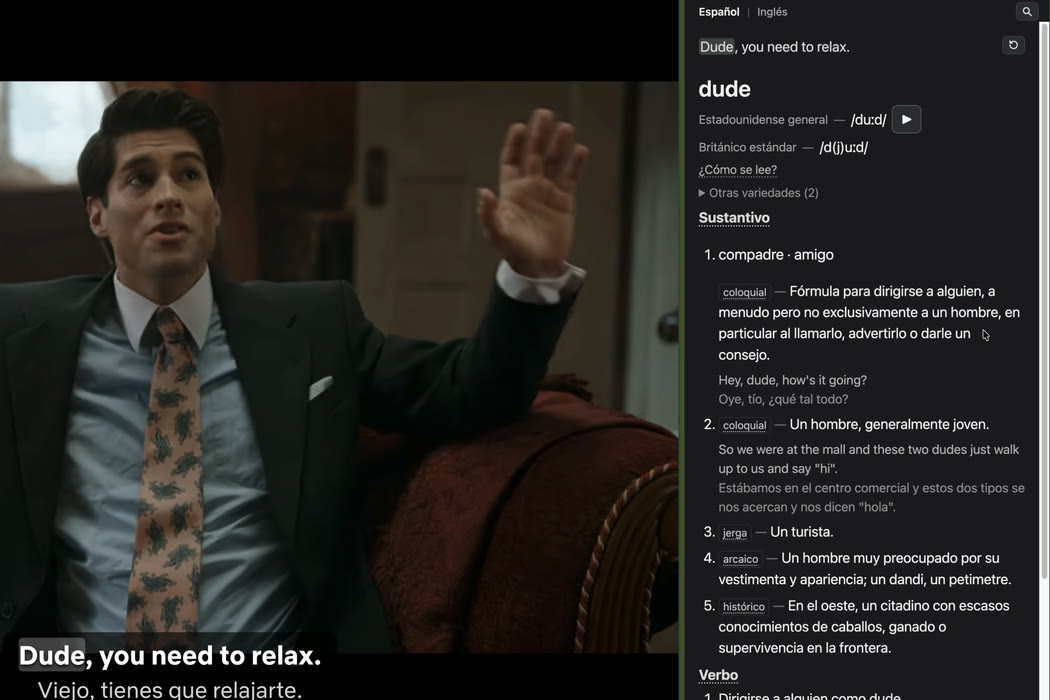
Rest the pointer on a word and the meaning it has in that line appears over the scene, with nothing stopping. Tap it and its entry opens beside the video.
- The sense of the lineThe short meaning is the one the word has in this line, not the first one in a list.
- The episode can waitYou decide whether the video pauses while you read the entry.
- The line stays with youThe line you tapped stays at the top of the panel, with the word marked and a button to hear it again.
- Look up any wordType a word in the panel’s search, even one that is not in the line.
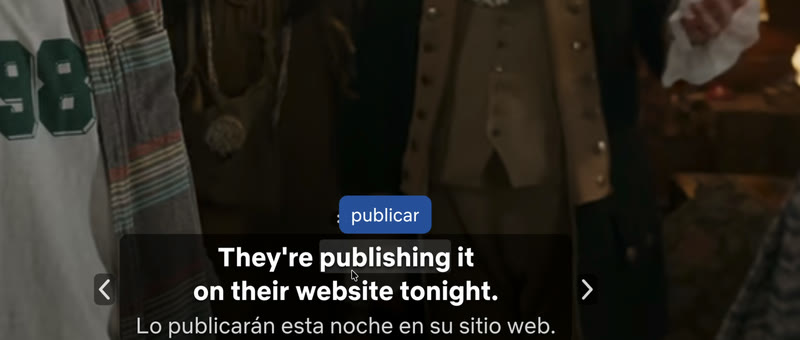
A dictionary made for dialogue
88,368 entries, 46,489 of them multi-word expressions, because so much of what people say comes in phrases.
- Senses by part of speechEach sense with its meaning in your language and real examples with their translation.
- Forms and expressionsWhen the line uses another form, the entry says which: «going» is a form of «go». It also lists the expressions that contain the word.
- In either languageA switch shows the explanations in Spanish or in English.
- A second opinionAt the foot of the entry, links to outside dictionaries.
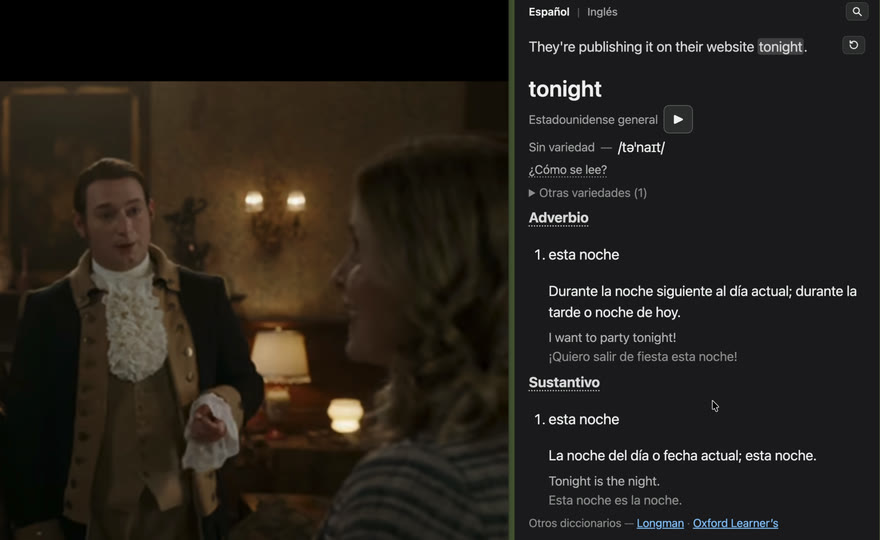
Grammar inside the scene
Every word you open shows its part of speech. Open it to see how it behaves, with examples, and what learners often mistake it for.
- Explained from your languageThe explanation sets English beside Spanish where they differ: what changes, what stays and what to listen for.
- When to say itInformal and slang words are marked, so you know whether they belong in your conversations or only on screen.
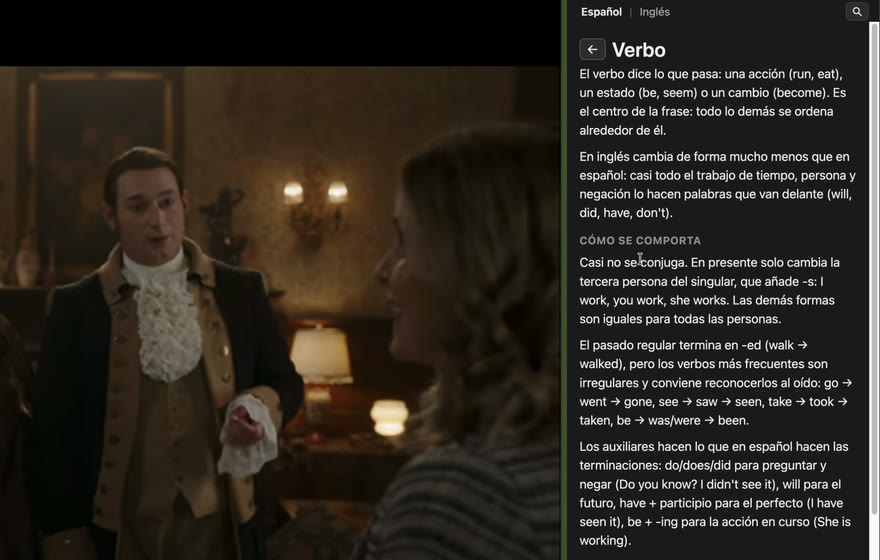
How it sounds
Each word with its American and British pronunciation, the phonetic symbols and a button to hear it, plus other varieties when there are any.
- A guide to the symbolsEach symbol explained with the closest Spanish sound.
- Hear the line againReplay the whole line from the panel, as many times as you want.
- Register at a glanceColloquial, slang, archaic: each sense says where it belongs.
You decide how much it helps
The «Zenyola ⚙» button in the player’s bar, or the extension’s button in Chrome, opens one menu in the side panel. Each choice applies at once, and the video keeps playing.
- Line by lineThe arrows at the sides of the subtitles take you to the start of the line, to the one before or on to the next.
- Less help when you are readyHide your language and go on with the line you learn alone.
- One menu for everythingDouble subtitles, the translation line, pausing, text size, the language pair and Zenyola’s language.
Account
- My accountSigned in
- Sign out
Subtitles
- Double subtitles
- Translation line
- Pause the episode while I look a word up
Dictionary
- Text size100%
Languages
- I am learningEnglish → Spanish
- Zenyola's languageThe browser's (English)
Zenyola
- Send feedback
- Recommend Zenyola
Every word you tap, kept
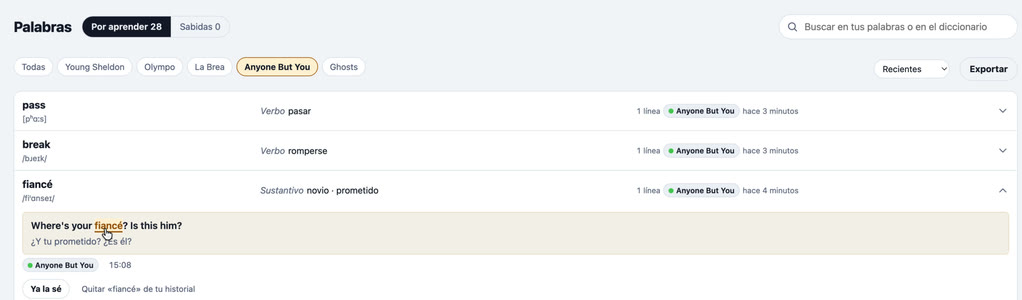
From the moment you sign in, your learning history keeps every word you tap with the line where you found it, and the titles you study. There is nothing to save by hand.
- Your student portalHome, Words, Titles and the dictionary: what you watched last, your recent words and the days you studied.
- To learn and known«I know it» moves a word to Known. Remove one and you can undo it.
- Take them with youExport your words with their lines, as CSV for a spreadsheet or as JSON for other apps.
- Yours to switch offThe history lives in your account alone. Turning it off deletes it.
Your account, with no password and no ads
A link to your email
You sign in with a link sent to your email. No password to remember.
No ads
Your data is not sold or shared.
Titles as a code
The titles you watch appear as a code, not by name; only we can match it, to fix what fails.
No video recorded
Zenyola never records or captures video.
Tell us from the panel
Report a word that looks wrong in two taps, or tell us what to improve.
Real screenshots of Zenyola over a series; the series belongs to its rights holders.